
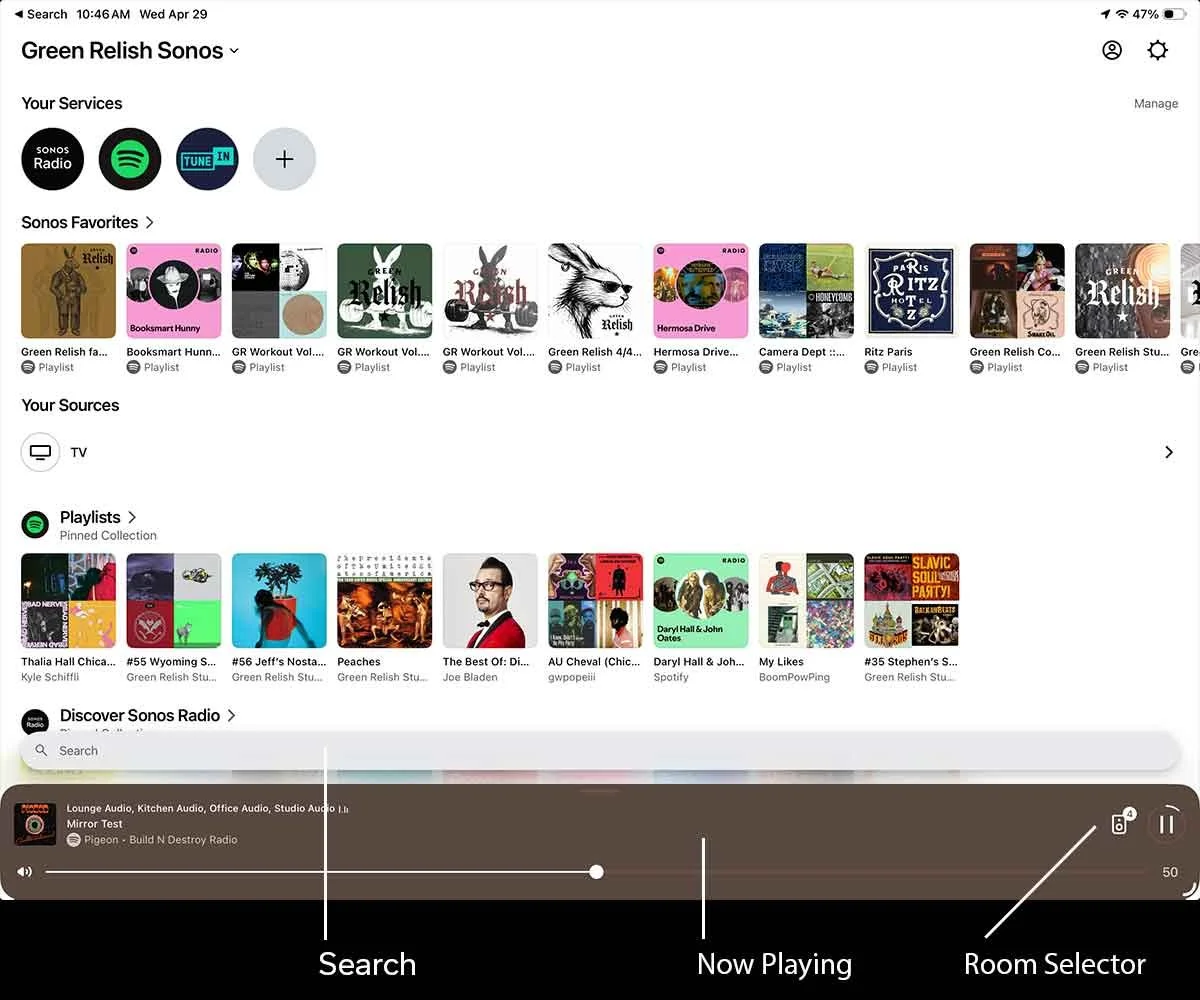
Play Music
Tap Sonos Favorites
Select a playlist
Music will begin instantly
———
Search for Music
Tap the Search bar near the bottom of the screen. Enter the artist, genre, album, or song you want and get a set of combined results from all your services.
Tap a result
Tap Play Now
———
Rooms & Zones
Music can be played in one room or across the entire space.
Steps:
Tap the speaker icon on the bottom Now Playing bar at the bottom of the screen and select or deselect rooms:
Lounge
Kitchen
Studio
Courtyard
Adjust volume per room or group rooms to play the same music everywhere
Tap “Apply”
———
Volume
Slider at the bottom of the screen controls volume for all rooms
Tap speaker icon to adjust individual rooms
Drag to adjust volume
Tap the left (volume down) or right (volume up) of the bar to adjust volume 1%.
———
Playback
Tap the bottom bar to bring up playback controls:
Play / Pause, Skip, Shuffle, Repeat
———
Tips
Start with Sonos Favorites for fastest setup
Group rooms for full-space playback
Lower volume before switching playlists
Changes happen instantly
Sound System
Green Relish uses a Sonos system controlled through the iPad near the kitchen. Follow the steps below to play music, adjust volume, and control each area.